
How it works
If you've wondered how an app can add a leader key to Xcode, which has had no plugins since Xcode 8, this page is for you. It's the short tour. The full map, with every file, is ARCHITECTURE.md in the repository, and the developer guides go deeper into each part.
Beside Xcode, not inside it
Xcode has no plugin system, and Source Editor Extensions only ever see the text of one file. So XCommander doesn't plug into Xcode at all. It's a separate app that drives Xcode from the outside, the way VoiceOver or Keyboard Maestro do.
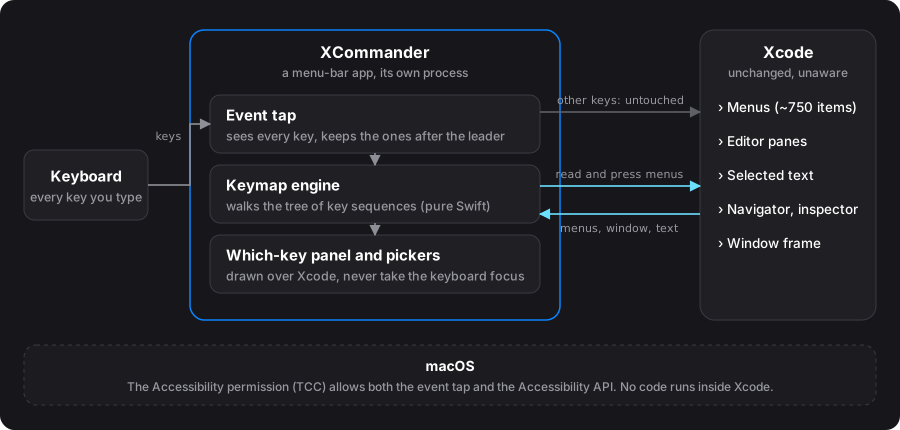
macOS gives an outside app three ways in, and XCommander uses two:
| Route | What it reaches | What XCommander does with it |
|---|---|---|
| Event taps (Core Graphics) | Every keystroke, before the app in front gets it | Spot the leader and take over the next few keys |
Accessibility API (AXUIElement) |
Another app's menus, windows, panes and text | Read Xcode's menus and press them, move between panes, edit the selection |
| Apple Events | Only what an app chooses to make scriptable | Not used: Xcode's scripting dictionary doesn't cover what's needed |
Both need the Accessibility permission. An event tap can't run in the App Sandbox, so XCommander can never be on the Mac App Store: it's signed with a Developer ID, notarized by Apple, and distributed directly.
The pieces
The code is one Swift package plus an Xcode project generated from a short project.yml.
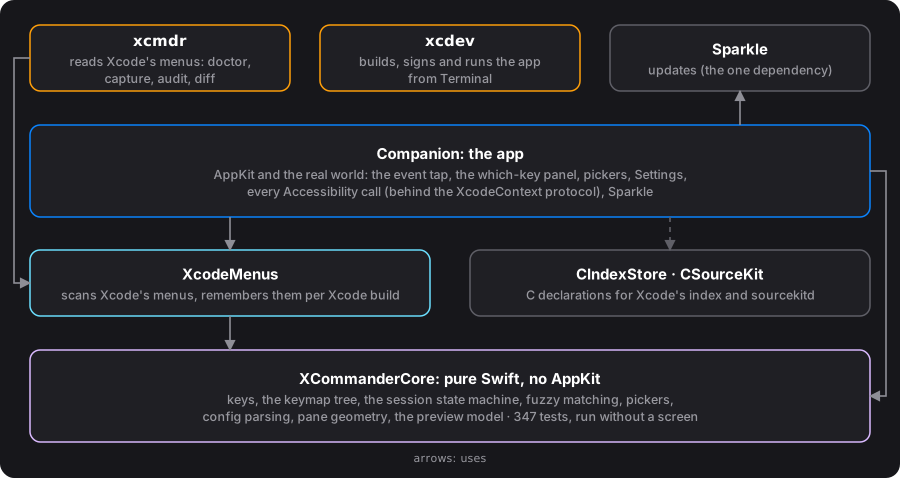
XCommanderCore knows nothing about AppKit. Keys, the keymap, the state machine that follows a sequence, fuzzy matching, config parsing, pane geometry, the preview model: all plain Swift, so swift test runs 347 tests without a screen in under a second. The app target, Companion, is kept thin. It translates between the real world (key codes, Accessibility elements, windows) and Core's value types.
Every question the app asks Xcode goes through one protocol, XcodeContext. Accessibility is the most fragile part of the system and the part most likely to change with a new Xcode, so it all lives in one place.
Two command-line tools sit beside the app, for anyone working on the code: xcdev builds and runs it from Terminal, and xcmdr reads Xcode's menus with the app's own code, to check a new Xcode or find a menu item's identifier. You don't need either to use XCommander; the repository's docs cover them.
The journey of a keystroke
This is the heart of the app.
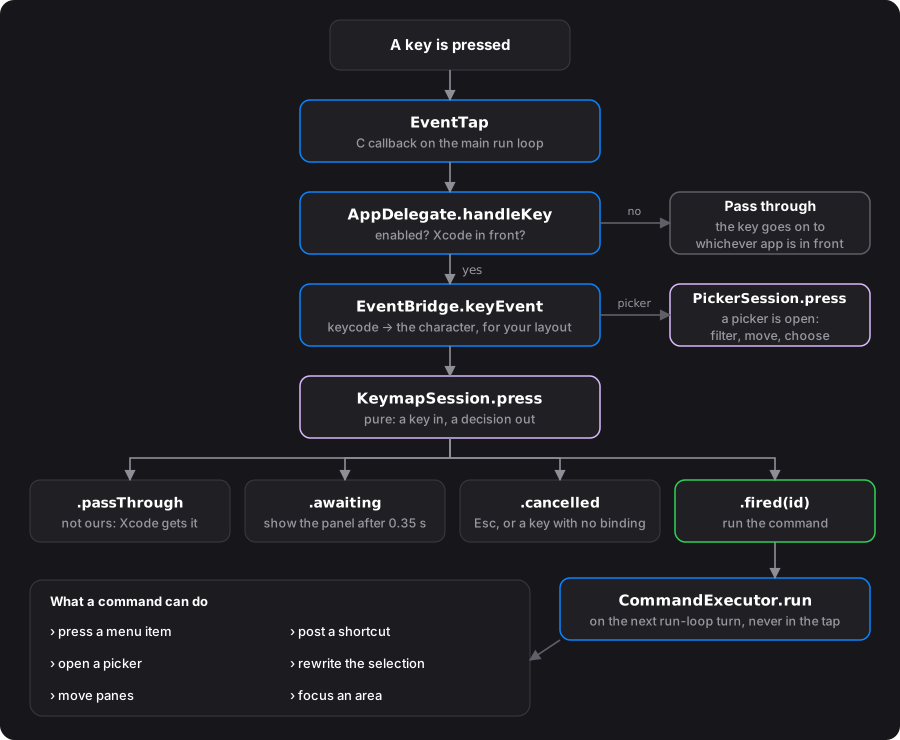
Three things make it work:
- The tap must be fast. The callback runs for every key you type, in every app. It decides "swallow or pass on" from in-memory state alone and returns in microseconds; if it were slow, macOS would switch the tap off. That's why a command never runs inside the callback, but on the next turn of the run loop.
- The session is pure.
KeymapSessionis a struct with no timers and no UI: you give it a key, it returns a decision (.passThrough,.awaiting,.cancelledor.fired). The app manages the panel delay and the timeout around it. That's why the whole modal engine is unit-tested. - Keys are characters, not key codes.
EventBridgeasks the current keyboard layout which character a key produces, so/means the key that types/, on a French, German or US keyboard alike.
The keymap is a tree
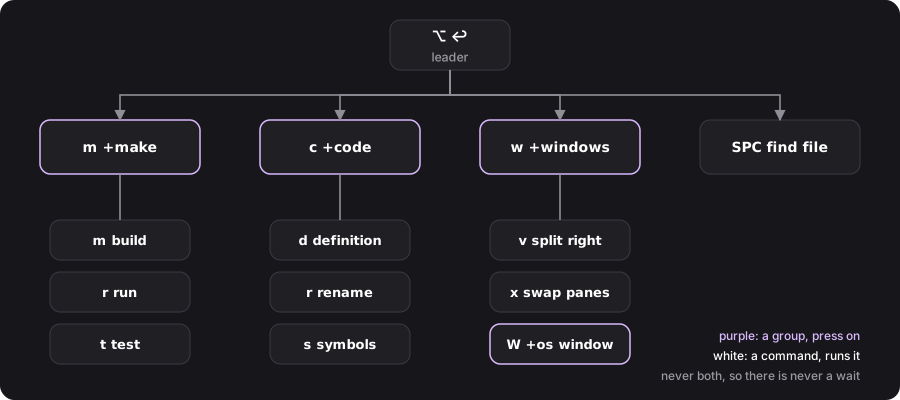
A key sequence walks a tree. A node is either a group (press another key) or a command (run it), never both. That rule is why XCommander never makes you wait: if m could be a command and the start of m m, it would have to pause after m to see whether another key was coming. Instead, the moment a sequence reaches a command, it runs.
The which-key panel is just the current node's children, drawn after a short pause. Your configuration file edits the same tree.
Talking to Xcode
- Commands name menu items by their action, not their title. A binding doesn't say "Product › Build". It says "the menu item whose action is
buildActiveRunContext:", which Xcode exposes as the item's accessibility identifier. Titles change between Xcode versions and languages; actions almost never do. When Xcode 27 renamed four items XCommander uses, nothing broke. - The menus are re-read every time you switch to Xcode, in the background (about 750 items, under a second), and remembered per Xcode build. A command your Xcode doesn't have is simply not shown. After an update, nothing is decided until Xcode's menus have settled: right after launching, on its Welcome window, Xcode shows far fewer menu items, and that isn't Apple removing commands.
- Running a command usually means pressing that menu item through Accessibility, silently, in about a millisecond. Only if Xcode refuses the press does XCommander type the item's shortcut instead, which works but makes the menu title blink.
- Things Xcode can't do are built from smaller pieces. Swapping two panes means reading which file each pane shows and reopening them the other way round. Text transforms read the selection from the editor's text area and write it back in one edit, so ⌘Z undoes them.
- The panels follow Xcode's window with an accessibility observer, and they're non-activating windows: they appear over Xcode without ever taking the keyboard away from it.
Pickers and the preview
- Files come from walking your project folder; recently used files float up.
- Project search runs ripgrep and streams results into the picker.
- Symbols come from Xcode's own index, read with the index store library inside Xcode.
- Syntax colouring in the preview uses SourceKit, the same engine Xcode uses, loaded from your Xcode at runtime. Nothing of Xcode's is bundled in XCommander.
Threads
Almost everything runs on the main thread, and Swift's @MainActor enforces it. The event tap's callback is on the main run loop, so it can read the app's state without locks. Because the tap shares that run loop, anything slow would delay every key you type, so the slow things move off it: re-reading the menus, ripgrep, loading SourceKit, reading the index. Their results come back to the main thread before they touch anything.
Permissions and privacy
- macOS ties the Accessibility permission to the app's code signature. Every official build, and every update, is signed with the same Developer ID, so the permission survives updates. A copy built from source is, to macOS, a different app.
- XCommander only acts while Xcode is in front. It logs its own commands, never what you type.
- Its only network request is the daily update check.
From a commit to your Mac
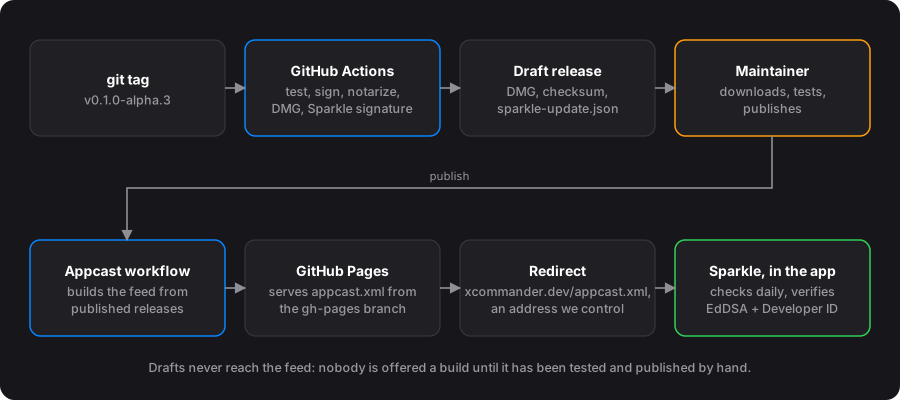
Releases are built by GitHub Actions from a tagged commit: tested, signed, notarized by Apple, packaged as a DMG and signed again for the updater. Nothing is built on a personal machine. Updates use Sparkle, XCommander's one dependency: before installing, it checks the update's EdDSA signature and that it's signed by the same Developer ID as the app you're running.
Read the code
XCommander is free and open source under the GPLv3. Good places to start:
- ARCHITECTURE.md: the full map.
- The journey of a keystroke and Driving Xcode with Accessibility: the two halves above, in depth.
- AppKit for iOS developers, if you know UIKit or SwiftUI and want to read the app's code.
- Decisions: why things are the way they are.
- CONTRIBUTING.md, if you'd like to help.